What Is Phishing? How to Spot Phishing Emails and Texts
Phishing is a fake message that tricks you into giving away passwords, card details or money. Spot it by the pressure, the link and a sender that is almost right. Here is how to check any email or text, where to report it and what to do if you already clicked.
FeedbackPlatform editorial teamNovember 25, 2026 9 min read
Phishing is a fake email, text, call or message that pretends to come from someone you trust, so you hand over passwords, card details or money. You can spot almost every phishing attempt by three things: pressure, a link or payment request, and a sender that is almost, but not quite, right.
In short
What it is: scammers impersonate banks, delivery companies, government agencies, your boss or your family to steal logins or money.
How to spot it: urgency or threats, a link, attachment or QR code, a web address that does not match, a request to log in, pay or share a code.
Golden rule: never log in, pay or share codes from a link in a message. Open the official app or type the address yourself.
Clicked and typed something? Change the password, call your bank on the number on your card, and report any loss.
What is phishing?
Phishing is a social-engineering attack: instead of hacking your computer, the scammer hacks your trust. The bait is a message that looks real; the hook is a fake login page, a malicious attachment or a phone number where a "support agent" is waiting.
It is the most reported cybercrime there is. In the FBI's 2025 Internet Crime Report, phishing and spoofing was the top complaint category with 191,561 complaints, as total reported losses reached $20.88 billion (Biometric Update). The FTC adds that imposter scams alone cost people $3.5 billion in 2025, with bank impersonators causing the highest reported losses.
What types of phishing should you know?
Phishing is no longer just email. These are the forms you will actually run into.
Type
Typical message
What they want
Email phishing
"Your account is on hold. Update your payment details within 24 hours."
Logins, card details
Spear phishing
"Hi Sarah, can you review the attached invoice before our call?"
Work logins, malware, payments
Smishing (SMS)
"USPS: your package is on hold. Pay $1.99 redelivery fee."
Card details
Vishing (voice)
Call from "your bank's fraud team", real bank number on screen
Money moved to a "safe account"
Quishing (QR)
QR code on a parking meter, letter or fake fine
Login or payment on a fake site
Business email compromise
"Our bank details have changed, please pay to this new account"
Invoice payments
Social media and messaging
"Hi Mom, new number, can you pay a bill for me?"
Direct transfer, gift cards
What is spear phishing?
Spear phishing is phishing aimed at one person or a small group. The scammer researches you first, using LinkedIn, company websites, data breaches or social media, then writes a message that fits your life: your manager's name, a real project, a vendor you use.
That is why the usual tell of a "generic greeting" does not help here. Instead, watch for unusual requests: an urgent wire, a change of bank details, gift cards for a client, or a document that requires you to log in again. Verify through a second channel you already know, like a phone call or a new message thread.
What is smishing?
Smishing is phishing by text message. Texts feel personal and are read within minutes, and sender names can be spoofed so a fake text appears in the same thread as real ones. Typical lures are delivery problems, unpaid tolls, bank alerts and tax refunds.
How do you spot a phishing email?
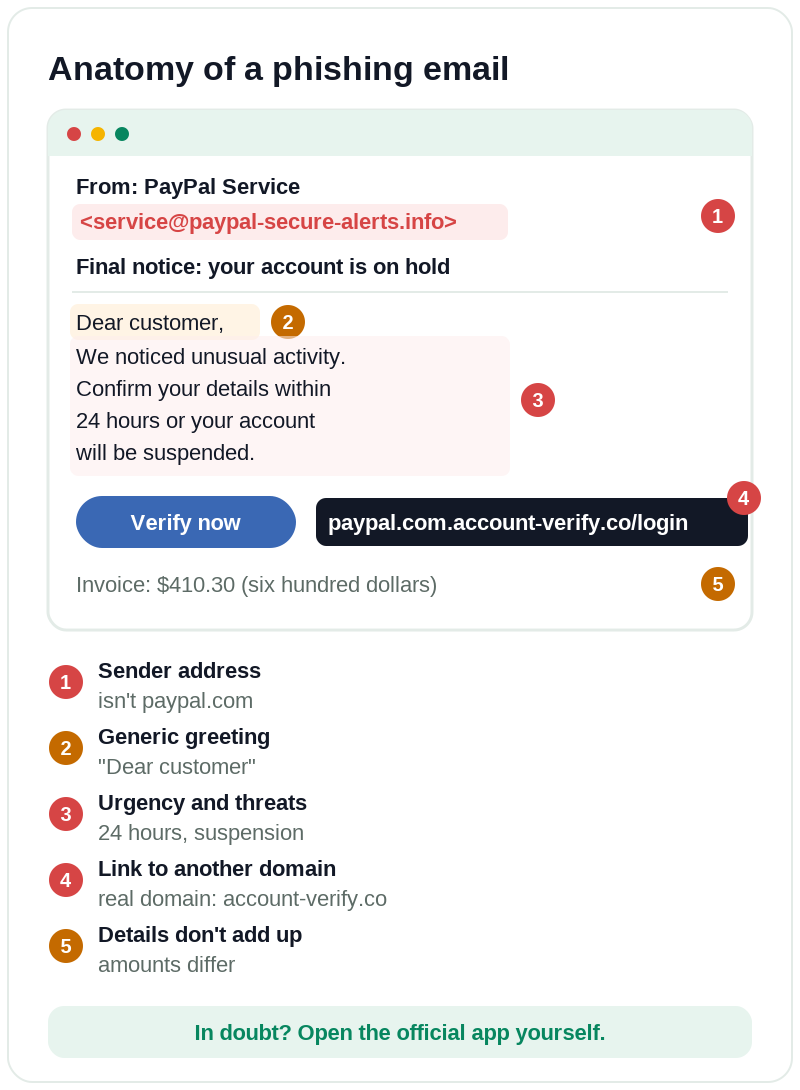
Good phishing emails look professional, logo and all. So ignore the logo and check these five places.
Five places where a phishing email gives itself away
The real sender address. Click or tap the display name. "PayPal" sending from [email protected] is fake.
The greeting. "Dear customer" is a red flag in mass phishing. Spear phishing will use your name, so do not rely on this alone.
Urgency or threats. "Within 24 hours", "final notice", "account suspended", "legal action".
The link or button. Hover (or long-press on a phone) to see the real address. Read the part right before the first single "/". In login.chase.com.account-verify.co, the real domain is account-verify.co.
Details that do not add up. An invoice you do not recognize, odd grammar, a reply-to address different from the sender, or an attachment you were not expecting (especially .zip, .html or files that ask you to "enable content").
When in doubt, go direct
Do not click. Open the company's app or type its address yourself. If something is really wrong with your account, you will see it there too. As the FTC puts it, legitimate companies won't email or text you a link to update your payment information.
How do you spot a phishing text?
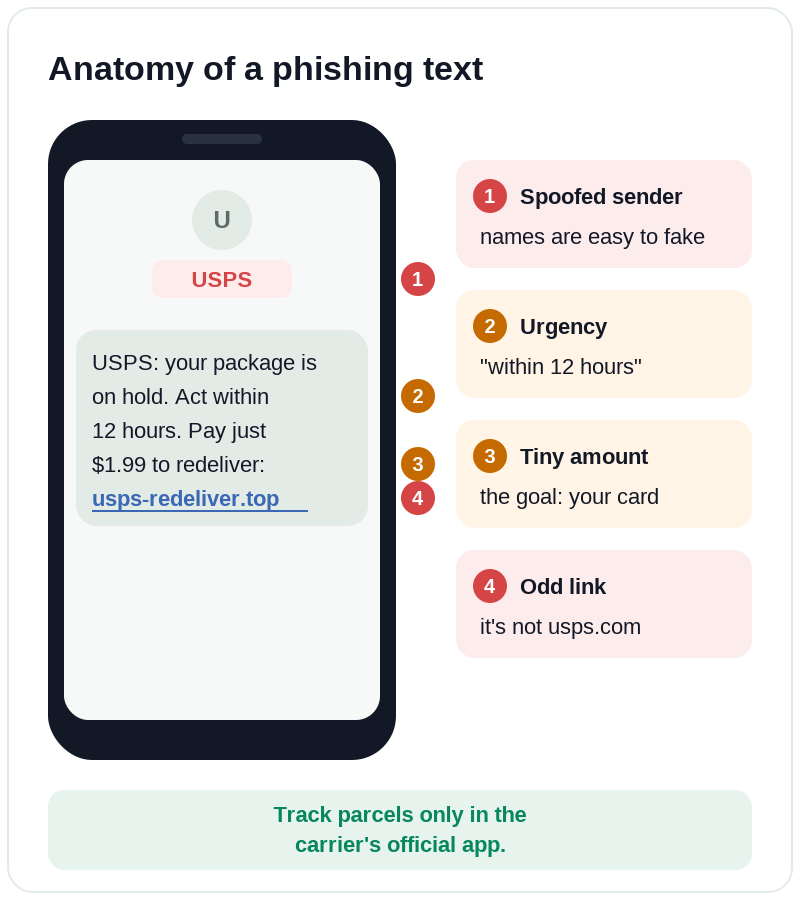
A text message has less room, so the tricks are compressed. Nearly every smishing text has a link and a reason to act now.
What a typical phishing text looks like
Watch for:
A link in a text from your bank, the IRS, HMRC or a toll agency. Check your account in the official app instead.
Tiny amounts. "$1.99 redelivery fee" lowers your guard. The real goal is your card number.
Strange domains like .top, .xyz or random strings of letters and numbers.
Packages you did not order. Track deliveries in the USPS, UPS, FedEx or Royal Mail app, not from a text link.
"Reply Y to activate the link." Replying tells the scammer your number is live and can make the link clickable.
Phishing checklist: is this message a scam?
Run through these questions. If any answer is "yes", stop and verify through a channel you trust.
Is there pressure: a deadline, fine, suspension or legal threat?
Are you asked to click, scan, log in, pay, or read out a code?
Does the sender's address or number differ, even slightly, from the official one?
Does the link lead to a different domain than the company's real one?
Were you not expecting this message at all?
Is someone asking you to move money to a new or "safe" account?
Is an "agent" asking you to install an app or share your screen?
Landed on an unfamiliar store or payment page from a message? Check the site before you enter anything. FeedbackPlatform's free check shows a Trust score that includes whether Google Web Risk flags the site and how old the domain is. Phishing sites are often only days old.
Is this website trustworthy?
Check any webshop for free: company details, reviews, payment safety and warning signs.
How Dana stopped a $4,800 transfer
Dana, who handles payments at a small design studio, gets an email from a regular supplier: "We've switched banks. Please use the new account below for invoice #2291." The logo, signature and invoice number are all correct, because the supplier's mailbox was hacked. One detail bothers her: the reply-to address ends in .co instead of .com. She calls the supplier using the number in her own contacts, not the one in the email. The supplier never changed banks. Dana forwards the email to [email protected] and the supplier resets its email password. The $4,800 stays put.
Where do you report phishing?
Reporting helps get fake sites taken down and warns others. In the UK, the NCSC says it had removed 454.8k scam URLs as of July 2026.
Call your bank, report to Report Fraud (0300 123 2040)
EU
Your national cybersecurity or police reporting site
Your mobile provider
Call your bank, file a police report
Sources: FTC and GOV.UK. Report Fraud replaced Action Fraud in England, Wales and Northern Ireland in January 2026; in Scotland, call Police Scotland on 101. In the UK, you can also report scam websites through the NCSC form and scam calls by texting "Call" plus the number to 7726.
Also report the message to the company being impersonated: most banks, PayPal and Amazon have a dedicated phishing address on their website.
You clicked or entered your details: what now?
Clicking alone is usually not the disaster; what you typed or installed afterwards is. Act by situation:
Clicked but entered nothing: close the page and do not download anything. That is usually enough.
Entered a password: change it right away, plus anywhere else you reuse it. Turn on two-factor authentication.
Entered bank login or card details: call your bank on the number on your card and block the card or online access. In the US, speed matters: for debit cards, reporting within 2 business days caps your liability at $50.
Gave your Social Security number or ID details: go to IdentityTheft.gov for a personal recovery plan, and consider a credit freeze.
Opened an attachment or installed an app: disconnect from the internet, remove the app, update your security software and run a full scan.
After a phishing attack, victims often get a call from "the bank" or "the police" offering help. It is usually the same scammer. Always hang up and call back on a number you already know.
How do you protect yourself from phishing for good?
You do not need to memorize every trick if you build a few habits.
Never log in from a link. Use the app or a bookmark.
Turn on two-factor authentication, ideally with an authenticator app or passkey rather than SMS.
Use a password manager. It will not autofill your password on a fake domain, which is a built-in alarm.
Agree on a family code word against "Hi Mom" and voice-clone scams.
Got a suspicious message open right now? Do not click anything. Forward it to the right address above, then delete it. If you already entered details, call your bank first and work through the steps in order. And share this checklist with someone less online than you: scammers count on them most.
Frequently asked questions
Regular phishing is sent to thousands of people with a generic story. Spear phishing targets you personally, using your name, employer, a colleague or a recent purchase to make the message believable. Because it looks tailored, it is more dangerous and often aimed at work accounts or payments.
Opening an email on a modern, updated email app is generally low risk. The danger comes from clicking links, opening attachments or replying with information. If you did click a link or open an attachment, update your security software and run a scan, and change any password you entered.
Forward phishing emails to the Anti-Phishing Working Group at [email protected] and suspicious texts to 7726 (SPAM). You can also report the attempt to the FTC at ReportFraud.ftc.gov. If the email impersonates a company, report it to that company too.
Forward suspicious emails to [email protected], run by the National Cyber Security Centre, and texts to 7726 for free. Report scam websites through the NCSC's online form. If you lost money, contact your bank and report it to Report Fraud, which replaced Action Fraud in 2026.
Yes. Quishing uses QR codes in emails, letters, parking meters or fake fines to send you to a phishing site. Before you enter anything, check the web address your phone shows after scanning. On parking meters, look for stickers placed over the original code and use the official app instead.
Call your bank immediately using the number on your card, not a number from the message. Ask them to block your card or online access and watch for unauthorized transactions. Change your online banking password. In the US, report quickly: for debit cards, reporting within two business days limits your liability to $50.
Is this website trustworthy?
Check any webshop for free: company details, reviews, payment safety and warning signs.
Read next
Scams and fake shops12 min read
Is This Website Legit? 18 Checks to Spot a Scam Site in 2 Minutes
To tell if a website is legit, check who owns it (company registry), how old the domain is, whether Google flags it, what other people say, and whether you can pay with buyer protection. Here are 18 signals and a 2-minute routine you can run before every purchase.
Scams and fake shops11 min read
Scammed Online? How to Get Your Money Back (2026 Guide)
Call your bank or card issuer within the hour, save every piece of evidence and report the scam. Whether you get your money back depends mostly on how you paid. Here is what to do for each payment method, with the deadlines.
Paying safely11 min read
Safest Way to Pay Online: Every Method Ranked by Protection
The safest way to pay online is a credit card, followed by PayPal (Goods and Services): both let you claw your money back if a seller doesn't deliver. Debit cards and buy now, pay later are middling. Bank transfers, Zelle, wires, crypto and gift cards offer almost no protection.