
 Login

How to Respond to Negative Reviews: 5 Steps + 14 Examples
Reply within a day or two, keep it short and personal: thank, own what's true, explain briefly, fix it and take the details offline. Includes 14 response examples for real situations.
You can't delete a Google review just because it's negative. You can get it removed if it breaks Google's policies (fake, conflict of interest, harassment, personal info) or is legally defamatory. Here's how to report it, appeal, and what to do if it stays.
You can't remove a Google review just because it's negative. Google only takes reviews down when they break its policies (fake, spam, conflict of interest, harassment, personal information) or when they're unlawful, such as defamation. Below: exactly which reviews qualify, how to report and appeal, how to handle review extortion, and what to do when a review stays.
Not directly. A review belongs to the person who wrote it, and only they can edit or delete it. As a business, you can report a review and Google decides whether it breaks its rules.
Google is blunt about it on its help page for reporting reviews: don't report a review just because you disagree with it or don't like it. A customer who honestly writes that their food was cold or their order was late is entitled to say so.
That's the bad news. The good news: reviews that really are fake or cross the line do get removed. Google says it blocked or removed more than 292 million policy-violating reviews in 2025.
Reviews that violate Google's Maps user-contributed content policy, which Google calls "prohibited and restricted content". These are the categories that come up most for businesses:
| Policy category | Example | Chance of removal |
|---|---|---|
| Fake engagement | Review from someone who was never a customer; a burst of reviews from brand-new accounts | Good, with evidence |
| Conflict of interest | Review by a current or former employee, competitor or relative | Good, if you can show it |
| Harassment and hate speech | Insults, threats, slurs | Good |
| Personal information | Phone number, home address or health details of a staff member | Good |
| Off-topic | Political rant, complaint about another business, job applicant who was never a customer | Fair |
| Advertising and solicitation | Links, promotion of another business | Good |
| Unclear or repetitive | Same text posted from several accounts | Fair |
| Impersonation | Someone posing as your business or an employee | Good |
| Negative but genuine | "Long wait, rude staff" | None |
The same policy applies to you. Businesses may not offer money, discounts or free products for reviews, or for changing or removing a negative review. Selectively asking only happy customers is also against the rules.
Reviews that Google removes for policy violations won't be restored. The reverse also happens: Google's spam filters sometimes remove a genuine positive review. If that happens, contact Business Profile support.
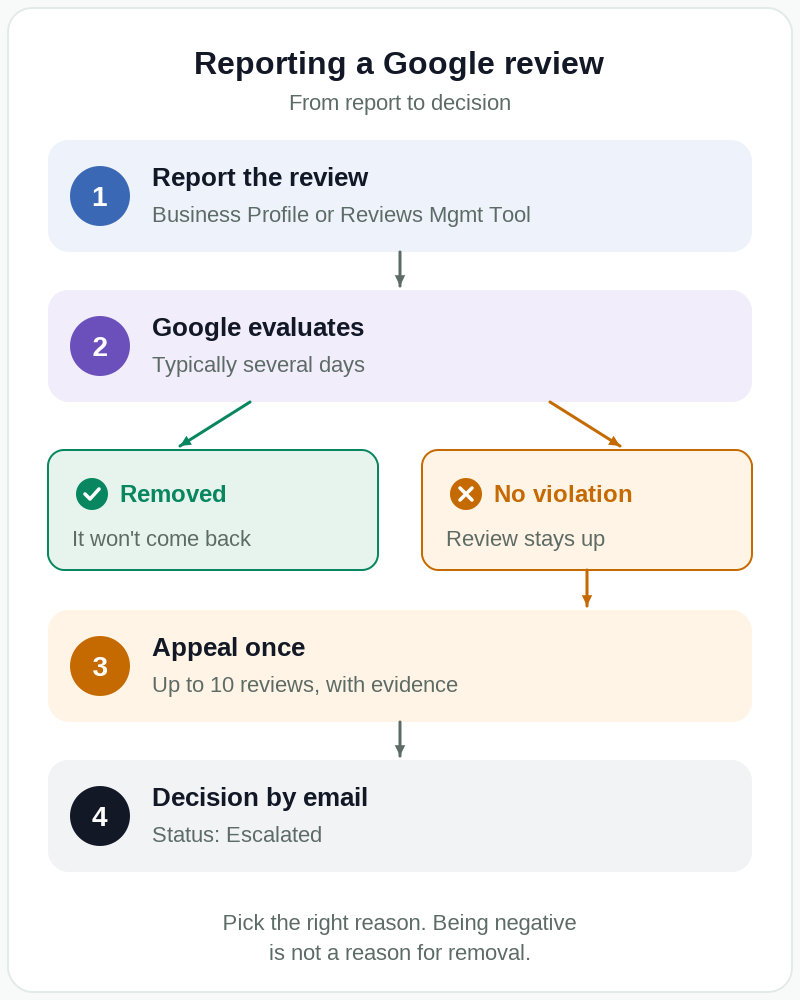
Report it from your verified Business Profile or through Google's Reviews Management Tool. Both lead to the same review queue; the tool also shows the status and is where you appeal.
From your Business Profile
Through the Reviews Management Tool
The reason you select tells Google what to look for. A former employee's review is a conflict of interest, not "fake". A rant full of insults is harassment or hate speech. Don't flag ten reviews with a reason that doesn't fit: it weakens all your reports.
Google says evaluation typically takes several days. The Reviews Management Tool shows one of these statuses:
| Status | What it means | What you do |
|---|---|---|
| Decision pending | Not evaluated yet | Wait, gather evidence |
| Report reviewed – no policy violation | Google is leaving the review up | Consider your one appeal |
| Escalated – check your email for updates | Your appeal is with a second reviewer | Wait for the decision email |
| Removed | The review is gone | Nothing |
Appeals: one per review. In the tool, choose Check the status of a review I reported previously and appeal options, then Appeal eligible reviews. You can select up to 10 reviews at once. Explain in the form why the review breaks the policy. Google emails you the result; it doesn't give a timeline.
Since you only get one shot, include concrete evidence: no matching customer in your records on that date, proof the reviewer is a former employee, the same text appears on another business's profile, the accounts were all created last week.
Never pay. Collect evidence and report it through Google's dedicated extortion form, which Google launched in November 2025 as these scams grew.
The pattern is consistent. A business suddenly gets a wave of 1- and 2-star reviews, often with no text. Then a message arrives, usually through WhatsApp, Telegram or email: pay, and the reviews stop or disappear. Don't pay, and they threaten more.
Here's what to do:
In April 2026 Google said its systems now detect these scam patterns better. When a spike of spam reviews hits a profile, Google removes the fake content, temporarily pauses new reviews, alerts the owner and shows consumers a banner.
On a Tuesday, a pizzeria receives 23 one-star reviews in three hours, all without text, all from accounts with no other reviews. That evening a WhatsApp message arrives from an overseas number: "Pay $300 in crypto and the reviews go away." The owner screenshots the message, saves links to all 23 reviews and submits Google's extortion form. He also reports each review as fake and files an IC3 complaint. He never replies to the scammer. Within days most of the reviews are gone. Under the few that remain, he posts one neutral line: "We can't find any visit or order matching this review; please contact us at hello@…"
When a review is defamatory, not just harsh. That's a high bar, and in the US you'll almost always be pursuing the reviewer, not Google.
United States
United Kingdom
This is a general overview, not advice for your situation. Whether a review is defamatory depends heavily on its exact wording, the facts and the jurisdiction. Speak to a lawyer before sending a demand letter or filing anything.
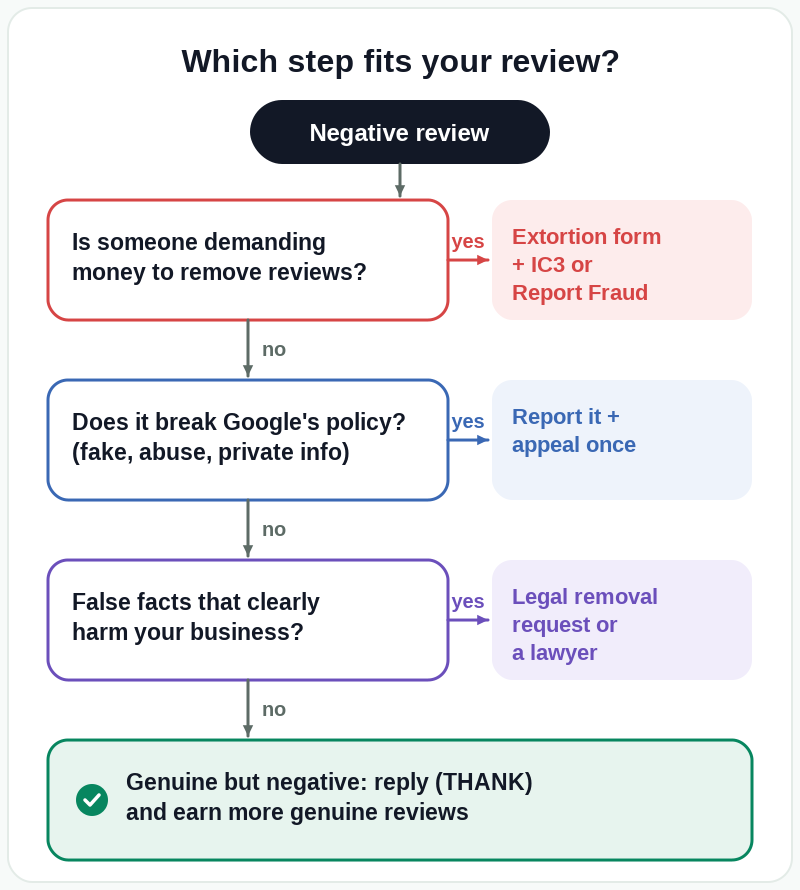
It all comes down to one question: is the review merely negative, or does it break rules or the law?
No. There's no setting to switch reviews off on your Business Profile. Google only disables reviews in a few cases:
What about deleting your Business Profile? It doesn't work. According to Google, your business may still appear on Search and Maps afterwards, and customer reviews remain. Only your own posts, photos and review replies are permanently removed. You'd mostly lose your own voice.
Make that one review matter less. Two things do that: a strong reply and more genuine reviews.
1. Reply professionally. A calm, helpful response defuses a bad review for future readers, and customers often update their rating afterwards. See 14 examples in how to respond to negative reviews.
2. Dilute it with genuine reviews. One 1-star review among five costs you a lot. Among two hundred, it barely registers. Most happy customers don't write a review until you ask. Read how to get more Google reviews and use these review request email templates. FeedbackPlatform's Starter plan includes a Smart Review Hub (link and QR code) that sends happy customers straight to your Google profile, with no cost per invitation.
3. Fix the underlying problem. If the same complaint keeps appearing, the review isn't the problem. It's the signal.
The stronger your evidence, the better your odds. Gather this first:
Every platform has its own rules, but the principle is the same: genuine negative reviews stay, rule violations can be reported. On FeedbackPlatform you can claim your profile and reply to reviews about your website for free. If you're weighing up review platforms, see our Trustpilot alternatives comparison.
Open the Reviews Management Tool today and go through your reviews. Report only the ones that genuinely break a rule, with the right reason and a short evidence file. Reply to every negative review that stays, and start a steady routine of asking happy customers for reviews. Three months from now, that one bad review will be a footnote.
Reply within a day or two, keep it short and personal: thank, own what's true, explain briefly, fix it and take the details offline. Includes 14 response examples for real situations.

To get more Google reviews, give every customer your official review link or QR code right after they experience your product or service, with no rewards and no cherry-picking. Here is exactly how.
A strong Google Business Profile is free and brings customers from Search and Maps. Here's how to create and verify it, fill in every field that matters, rank locally and avoid suspension.