Google Business Profile Guide 2026: Set Up, Verify, Optimize
A strong Google Business Profile is free and brings customers from Search and Maps. Here's how to create and verify it, fill in every field that matters, rank locally and avoid suspension.
FeedbackPlatform editorial teamNovember 25, 2026 13 min read
A Google Business Profile is the free listing that appears when someone searches for your business on Google or Maps. A complete, verified and active profile gets you found, called and visited more often. This guide shows how to set it up, which fields actually matter, what changed in 2024 and 2025, and how to avoid a suspension.
In short
Create and manage your profile for free at business.google.com. Google My Business was renamed Google Business Profile in late 2021.
Verification usually happens by video recording, live video call, phone, text or email. Google reviews it within about five business days.
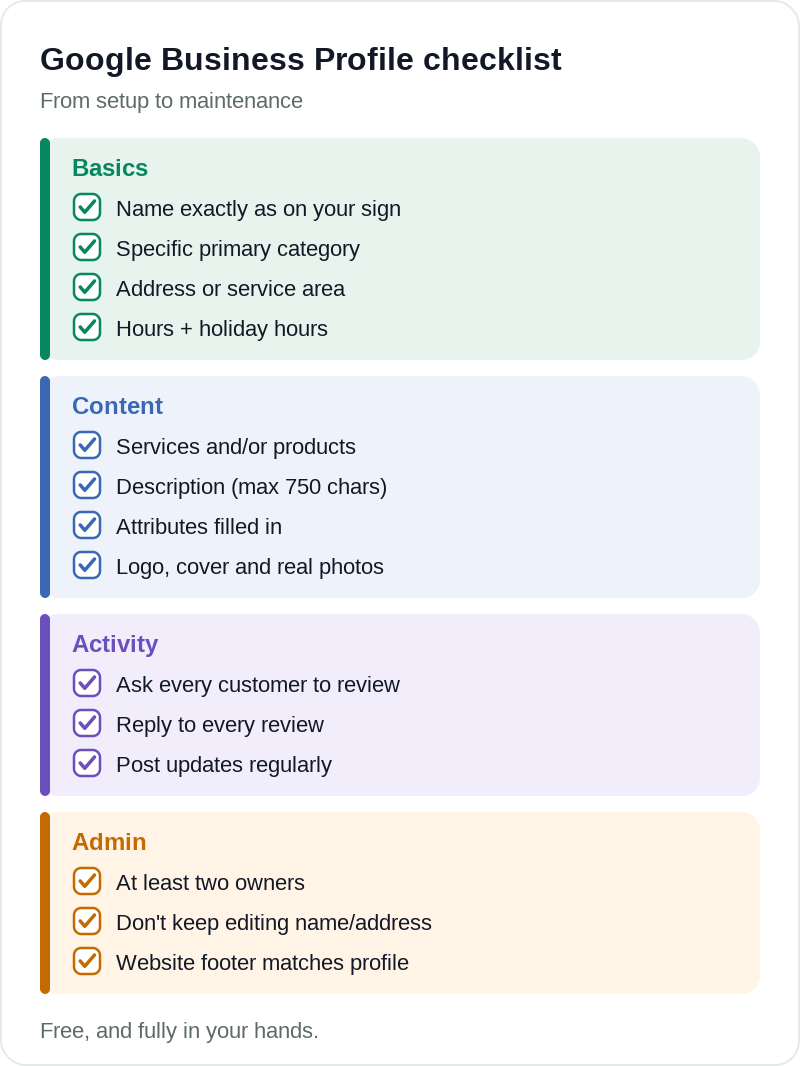
Nail the basics: name exactly as on your signage, a specific primary category, address or service area, hours including holidays. Then services, description (max 750 characters), attributes and real photos.
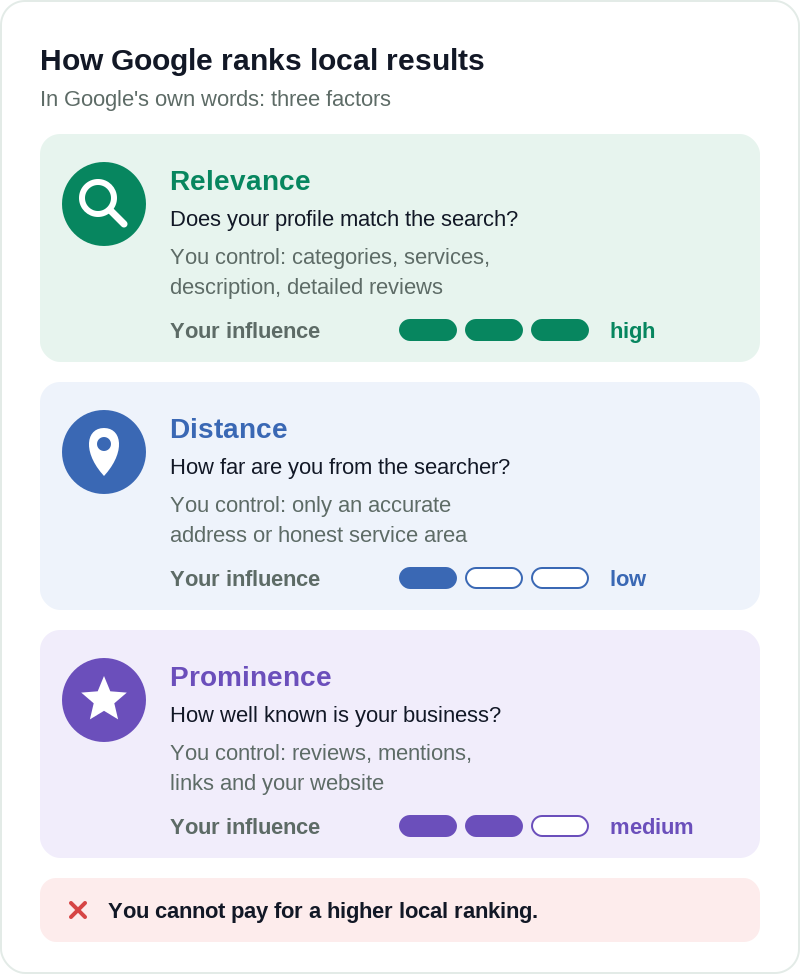
Google ranks local results on relevance, distance and prominence. You can't pay for a higher ranking.
Chat and call history were removed in July 2024, and Questions & Answers was phased out in late 2025.
Most suspensions come from keywords in the business name, virtual offices or PO boxes, and duplicate profiles.
What is a Google Business Profile?
It's your business card on Google Search and Google Maps: name, address, hours, phone, website, photos and reviews. Customers see it on the right of desktop results, at the top on mobile and in the Maps app.
Until late 2021 it was called Google My Business, and plenty of people still search for that name. It's the same product. The separate management app is gone: you work in the browser at business.google.com or directly in Google Search and the Maps app.
A profile can exist even if you never created it. Google sometimes builds listings from public data or user suggestions. In that case, claim the existing profile instead of creating a new one.
How do you create a Google Business Profile?
You need a Google account (ideally an address on your own domain) and a business that meets customers in person: a storefront or office customers visit, or a business that travels to customers.
Go to business.google.com and sign in with the account that should own the profile.
Type your business name. If it already appears in the list, select it and claim it. If not, create a new profile.
Choose your primary category. Be specific: "Hair salon" beats "Beauty salon" if you mostly cut hair.
Say whether customers visit you. If yes, enter your address. If no, or also, set your service area.
Add your phone number and website.
Choose a verification method (see below) and complete it.
Once verified, fill in the rest: hours, services, description, photos.
No PO boxes, no virtual offices
Google's guidelines for representing your business don't allow PO boxes or virtual offices. A co-working space only qualifies if you have clear signage there, staff on site during business hours, and customers can visit you.
How does Google Business Profile verification work in 2026?
With whichever method Google offers you; you can't always choose. The options depend on your category, country and the profile's history.
Method
How it works
Watch out
Video recording
One continuous video showing your location, your business and proof you manage it
Offered most often; you can preview the video before submitting
Live video call
A Google support rep guides you over video
Only during your business hours, and you must be on site
Phone or text
A code is sent to your business number
Phone menus (IVR) won't receive the code
Email
A link goes to an address Google shows you
Works best with an email on your own domain
Postcard
Google mails a five-digit code to your address
Usually arrives within 14 days; code expires after 30 days
According to Google's verification help page, it reviews your information for up to five business days after you finish. Verification can be instant if you've verified your website in Google Search Console or use bulk verification.
How to pass video verification
Google wants to see three things: where you are, that the business exists, and that you manage it.
Location: the street sign, house number or neighbouring businesses, and your permanent signage.
Business: your products, tools, branded vehicle or marketing materials.
Management: unlocking the door with your key, opening the register, showing a staff-only area or a business document.
Make sure the name on your signage exactly matches your profile name. If you have no sign because you work at customers' homes, set up a service-area business and film your branded vehicle, tools and a job in your service area.
After verification, hold off on big edits
A new name, address or primary category right after verification can trigger re-verification or even a suspension. Wait a couple of weeks before major changes and fill in the rest of the profile first.
How do you log in to your Google Business Profile?
Go to business.google.com, or search for your business name on Google while signed in. If you're an owner or manager, your management panel appears above the results.
See nothing? You're probably signed in with a different Google account. Check the account in the top right corner.
Has someone else claimed the profile, like a former employee or an agency? Select Request access when you try to claim it. According to Google, the current owner is emailed and has three days to respond. If they don't, you may be able to claim the profile yourself through the link in your confirmation email.
Which Google Business Profile fields matter most?
All of them, but not all equally. The core details decide whether you're found; the rest decides whether you're chosen.
Field
Why it matters
How to do it right
Business name
Must be your real-world name
Exactly as on signage and stationery, no city or keywords
Primary category
Strongest relevance signal
As specific as possible; describes what you are
Additional categories
For other core activities
Only what you really do, not everything you sell
Address or service area
Decides which places you show up for
Service area no more than about 2 hours' drive from base
Hours
Shoppers rely on "Open now"
Add special hours for holidays and closures
Phone
Calls straight from Maps
A number someone answers; up to two extra numbers
Website
Click-through to your site
Link to the right location page, optionally with UTM tags
Description
Context for customers and Google
Max 750 characters, no URLs, no promotions or prices
Services and products
Matches specific searches
Each service separately, with a short description and optional price
Attributes
Filters like "wheelchair accessible"
Fill in everything that's true
Photos and video
Shows who you really are
JPG or PNG, 10 KB-5 MB, ideally 720×720 px; video up to 30 s
Posts
News, offers, events
Can be scheduled; posts older than six months are archived
The name rules are strict. Google doesn't allow taglines, store codes, hours, phone numbers, URLs or location details in the business name, and breaking that rule can lead to suspension. "Riverside Dental" is fine; "Riverside Dental | Best Emergency Dentist Austin TX" isn't.
Photos that work
Real photos always beat stock images. Show your storefront (so people recognise it), the interior, your team at work, and your products or results. Google asks for photos that are in focus, well lit and not heavily filtered. Customers can add photos too; you can report inappropriate ones.
Posts: small effort, visible result
Posts let you share updates, offers and events. You can schedule them and set them to repeat. A phone number in the post text may get it rejected if Google can't connect the number to your business. One post a month keeps your profile alive without much work.
What has Google removed from Business Profiles?
A few well-known features, so don't follow old tutorials blindly.
Chat and call history: removed on 31 July 2024, according to Google.
Websites built with Business Profile: taken offline in 2024. If that's still the only website on your profile, replace it with your own site.
Questions & Answers: Google phased out the Q&A section in late 2025. In the Maps app, in some countries and categories, users can now ask a question that AI answers using your profile details, reviews and other sources.
That last change makes a complete profile even more important. If your parking, accessibility or menu isn't on your profile, an AI answer can't get it right. Publish your FAQs on your own website as well.
How does Google rank businesses on Maps?
According to Google itself, on three factors: relevance, distance and prominence. And: "There's no way to request or pay for a better local ranking on Google."
You barely control distance, but you can work on relevance and prominence.
Relevance is how well your profile matches what someone is searching for. Your primary category, services, description and the words in your reviews all play a part.
Distance is how far your business is from the searcher or the location they searched. All you control is an accurate address or service area.
Prominence is how well known your business is. Google mentions how many websites link to your business and how many reviews you have, saying "more reviews and positive ratings can help your business's local ranking." A strong website and coverage in local media help too.
About keywords in your name
Businesses with a keyword in their name sometimes seem to rank higher. But a name that doesn't match your signage breaks the guidelines, and competitors love to report it. The suspension risk isn't worth it.
How should you handle reviews on your profile?
Reviews are the part of your profile customers read most, and they weigh on prominence. Two habits make the difference: ask every customer for a review, and reply to every review.
Stick strictly to the rules: no incentives for reviews and no asking only happy customers. If Google detects fake reviews, it can restrict your profile: block new reviews for a period, unpublish existing ones, and show a warning on your profile that fake reviews were removed. In the US, fake reviews can also break the FTC's rule on consumer reviews, in force since October 2024.
FeedbackPlatform can help with the Smart Review Hub: one link and QR code that sends customers to Google or another platform. You can also show your Google reviews on your website with review widgets, synced weekly. Google's own review link and QR code do the basic job for free.
Why do Google Business Profiles get suspended?
Usually because something on the profile doesn't seem to match reality. The most common causes:
Keywords or city names in the business name.
An ineligible address: PO box, virtual office or co-working desk without signage and staff.
Duplicate profiles for the same business at the same address.
A service area far larger than you realistically serve.
Many major edits in a short time, especially name, address and category.
A broken website or one that doesn't match your profile.
Fake or purchased reviews.
Suspended? Don't create a new profile; that makes it worse. Use Google's appeals tool and attach evidence whose name and address exactly match your profile: a business license, registration documents or a utility bill. Each decision can be appealed once. After a denial you can request one more review with new evidence.
A plumber in Austin
A plumber working from home named his profile "Emergency Plumber Austin 24/7 | Garcia Plumbing", with his home address visible. After a competitor reports it, the profile is suspended.
To fix it, he renames it "Garcia Plumbing", exactly as on his state license and van. He hides his address, sets Austin and nearby cities as his service area, and adds "Emergency plumbing" as a service. In the appeal he attaches his license and a photo of the branded van.
Once reinstated, he lists each service separately, uploads photos of real jobs and texts every customer a review link after the job. He now gets found through his services, not a keyword-stuffed name.
How do you manage multiple locations, managers and ownership?
Every location that serves customers gets its own profile. Use the same name and primary category for all of them, and link each profile to its own location page on your website.
Bulk verification: with at least ten locations of the same business, you can apply for bulk verification. Agencies managing several businesses in one account and service-area businesses aren't eligible.
Roles: a profile has one primary owner, plus optional owners and managers. Managers can do almost everything, but can't add users or remove the profile. You set this under Business Profile settings → People and access.
Transferring ownership: the primary owner can transfer to an existing owner or manager. New users must wait seven days first, according to Google.
Never make your agency the only owner
Give a marketing agency or web designer the manager role, not primary owner. Always keep at least two people from your own company as owners. If the agency or an employee leaves, you keep control.
How do you edit or delete a Google Business Profile?
To edit, go to business.google.com or search your business name on Google and choose Edit profile. Google reviews changes before they go live, and a new name or address can require re-verification.
Stopping? You have two options:
Mark as permanently closed. Customers see you've closed, and the profile gradually disappears from search results. This is the right choice if the business really stops.
Remove the profile. Go to Business Profile settings → Remove Business Profile. According to Google, your photos, posts and review replies are permanently deleted and you lose management access. Customer reviews stay, and the business may still show on Maps. It can't be undone.
Moving? Update the address instead of creating a new profile, so you keep your reviews. Expect to verify again.
Fifteen points for a profile that gets found and chosen.
Your business already has a profile
Claim it for free, reply to reviews and collect more reviews on Google and your own website.
Log in at business.google.com today and work through the checklist above: name, primary category, holiday hours and at least two owners. Then set a routine: ask every customer for a review, reply every week, and add a post and a few new photos every month. Selling online too? Read on about ecommerce trust signals.
Frequently asked questions
Yes. Creating, verifying and managing a Google Business Profile costs nothing. You only pay if you choose to run Google Ads. Google also says there is no way to request or pay for a better local ranking. Be wary of callers who claim your listing will be removed unless you pay for 'Google verification'.
After you complete the verification steps, Google says it reviews your information for up to five business days, occasionally longer. Postcards usually arrive within 14 days and the code expires after 30 days. While you wait, don't edit your business name, address or category, because that can invalidate the code or delay verification.
Yes. Google My Business was renamed Google Business Profile in late 2021. It's the same free listing in Google Search and Maps. You now manage it at business.google.com, or directly in Google Search and the Maps app when you're signed in with the Google account that owns the profile.
Yes, if you serve customers at their location, like a plumber or cleaner. You set up a service-area business and hide your address. You still need a real address for verification, and PO boxes or virtual offices aren't allowed. Customers only see the cities or areas you serve.
Usually the profile isn't verified yet, an edit is pending review, or the profile is suspended. Check the status at business.google.com. If everything is fine, you may simply rank low on relevance or prominence for that search. Choose a more specific primary category, add services and collect more reviews.
Removing your profile in settings deletes your own photos, posts and review replies, but customer reviews stay. The business may also remain visible in Search and Maps. The removal can't be undone. To manage the business again, you'd have to re-verify the profile.
Google recommends 720 by 720 pixels, with a minimum of 250 by 250. Files should be JPG or PNG between 10 KB and 5 MB, in focus and well lit, without heavy filters. Videos can be up to 30 seconds and 75 MB at 720p or higher. Media only appears publicly once your profile is verified.
Your business already has a profile
Claim it for free, reply to reviews and collect more reviews on Google and your own website.
Net Promoter Score: how to calculate NPS and what a good score is
Net Promoter Score is the percentage of promoters (9–10) minus the percentage of detractors (0–6), giving a number from −100 to +100. Here is how to calculate it, run the survey and act on it.
Getting more reviews12 min read
How to Get More Google Reviews: The Complete 2026 Playbook
To get more Google reviews, give every customer your official review link or QR code right after they experience your product or service, with no rewards and no cherry-picking. Here is exactly how.
Trust and conversion13 min read
Ecommerce Trust Signals: The Checklist That Lifts Conversion
Shoppers buy when doubt disappears. This checklist covers the trust signals that move ecommerce conversion: business identity, payment options, policies, reviews, trust badges and the technical basics.

 Login