
 Login
Google Business Profile Guide 2026: Set Up, Verify, Optimize
A strong Google Business Profile is free and brings customers from Search and Maps. Here's how to create and verify it, fill in every field that matters, rank locally and avoid suspension.
To get more Google reviews, give every customer your official review link or QR code right after they experience your product or service, with no rewards and no cherry-picking. Here is exactly how.
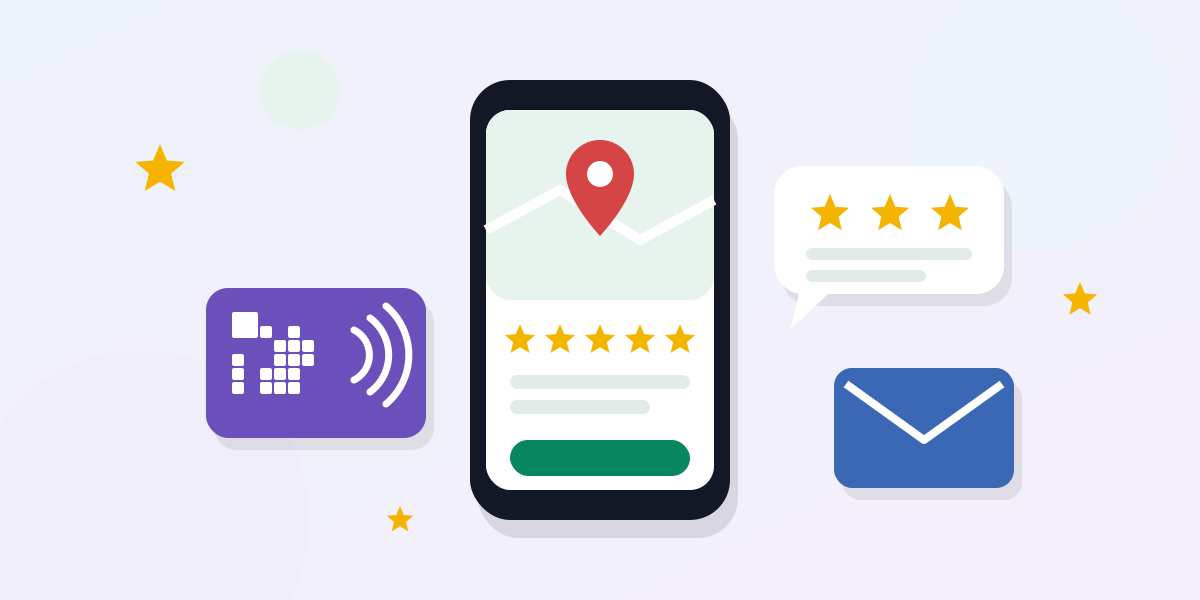
You get more Google reviews by building a routine, not by running a one-off campaign: every customer receives your official review link at the right moment, through the channel they already use. This guide shows where to find that link, when and how to ask, what Google and the law forbid, and a 30-day plan to make it stick.
Google reviews influence whether you show up in the map pack and local results, and whether people pick you once they see you. They pay off twice: visibility and conversion.
Google says local results are based on relevance, distance and prominence. On prominence, Google states that it is based partly on how many reviews you have, and that more reviews and positive ratings can help your local ranking. You can't move closer to every searcher. You can earn more reviews.
Northwestern University's Spiegel Research Center found that a product with five reviews is 270% more likely to be purchased than one with none. The first handful of reviews makes the biggest difference. Interestingly, purchase likelihood peaks at ratings between 4.0 and 4.7, not at a perfect 5.0. A few critical reviews make you more believable, not less.
Recency matters too. In BrightLocal's Local Consumer Review Survey 2026 (1,002 US consumers), 74% said they look for reviews written in the last three months, and 68% will only use a business with four stars or more. A profile with 300 reviews and nothing since 2023 looks less alive than one with 60 reviews and a new one every week.
Your official review link lives in your Google Business Profile. Here is how to get it, following Google's own instructions:
g.page/r/…/review.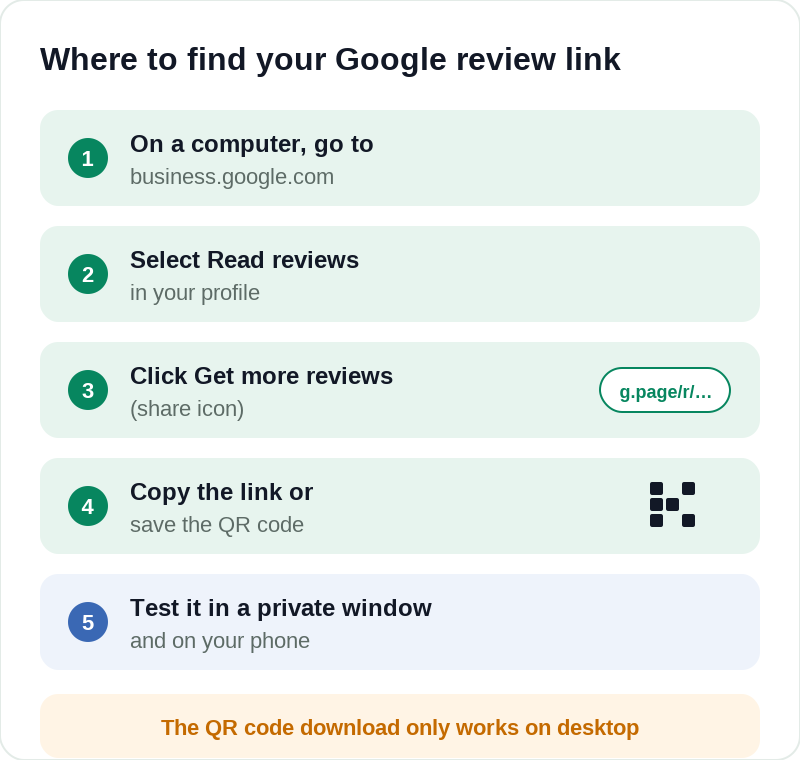
Plenty of "Google review link generators" still build links from your place ID using older URL formats, and some of them break when Google changes things. Use the link Google gives you. Also remember: customers must be signed in to a Google account to post a review. Some people will drop off at that step, which is one more reason to ask everyone.
Ask right after the customer has experienced the result, and as soon after that as possible. Too early (the order hasn't arrived) feels pushy. Too late (three weeks after the job) and they've moved on.
| Business type | Best moment | Best channel |
|---|---|---|
| Online store | 2–5 days after delivery (longer for products people need to use first) | Email, QR code on the packing slip |
| Restaurant, café, bar | At checkout, or the same evening | QR code on the check or table, NFC card at the register |
| Salon, spa, clinic | Right after the appointment, within 2 hours | Text message, QR code at the front desk |
| Contractor, plumber, cleaner | When the job is signed off and the customer says "looks great" | Ask in person, then text or email the same day |
| B2B / agency | After a milestone: launch, project completion, a good quarterly review | Personal email from the account manager |
The key: tie the request to a fixed step in your process. That way you never forget, and you automatically ask everyone, not only the customers who happened to seem delighted.
The best channel is the one your customer is already using with you. The goal is always the same: from "sure, I'll do it" to the star screen in two taps or fewer.
| Channel | Pros | Cons |
|---|---|---|
| Cheap, easy to automate, room for a personal note | Lower visibility: easy to ignore or miss | |
| Text message (SMS) | Almost always seen, great right after an appointment | Costs per message, consent rules (TCPA) in the US |
| Personal, popular in the UK and Europe | Only with the customer's opt-in, per WhatsApp's business policy | |
| QR code on receipt, slip or packaging | Set it up once, reaches every customer | Passive: customers must scan on their own |
| NFC card or stand | Fast at the counter, a natural conversation starter | Doesn't work on every phone, only in person |
| Counter sign or window sticker | Always visible | Passive; without a personal ask it does little |
A Google review card is a card or tabletop stand with an NFC chip, usually with a QR code printed on it. The customer taps their phone and your review page opens. These cards are sold by third parties, not by Google.
They shine where customers are physically with you: the register, the front desk, the treatment chair. Check three things before you buy. The customer needs a phone with NFC turned on, so pick a card that also has a QR code. Make sure the chip points to your official Google link, or to a redirect you control. And avoid vendors that lock the card to their own subscription, so it doesn't go dead if you cancel.
A QR code on the receipt, packing slip, invoice or a counter sign is the cheapest way to reach every customer. Add a short line ("How did we do? Scan to review us on Google") and print it at least about an inch (2–3 cm) wide. A sign on its own rarely moves the needle. Pair it with a personal ask ("Would you mind leaving us a quick review? Here's the code") and it works far better.
Asking for reviews is always fine. Rewarding reviews, faking them and filtering who gets asked are not. That's in Google's policy, and in the US and UK it's also in the law.
Under Google's rules, businesses may not:
US: The FTC's rule on consumer reviews and testimonials took effect on October 21, 2024. It bans buying or selling fake reviews, incentives conditioned on a positive (or negative) review, undisclosed insider reviews, and review suppression through threats or intimidation. Violations can bring civil penalties of more than $50,000 each.
UK: Since April 6, 2025, the Digital Markets, Competition and Consumers Act 2024 bans fake reviews and concealed incentivized reviews. The CMA can fine up to 10% of global turnover without going to court, and has opened investigations under these powers.
EU: Fake reviews have been banned across the EU since the Omnibus Directive (applied from May 28, 2022).
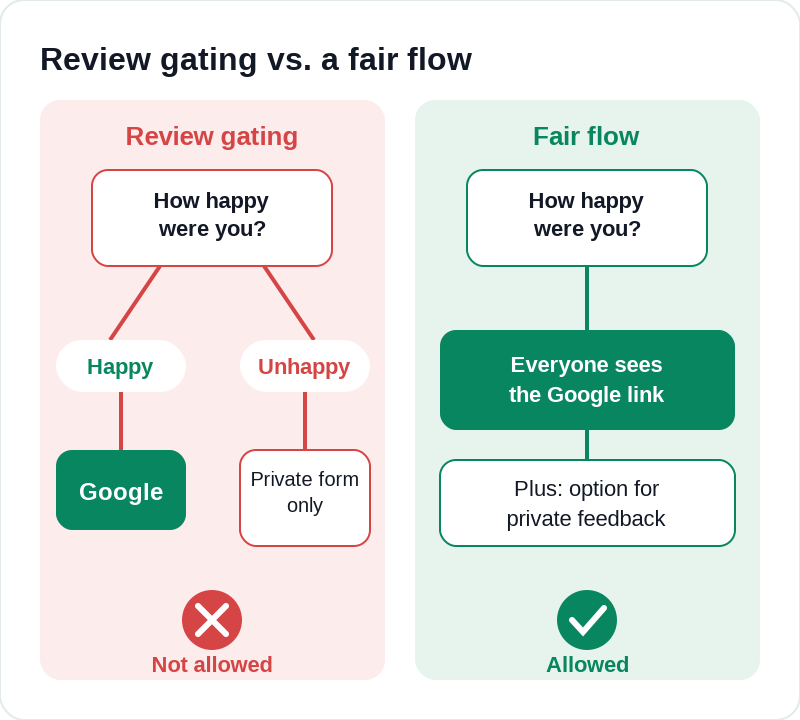
Review gating puts a filter in front of your review link: you first ask "How happy were you?", and only people who answer 4 or 5 stars see the Google link. Everyone else lands on a private feedback form. It feels clever, but it is exactly the "selectively solicit positive reviews" that Google bans.
US regulators agree. The FTC's Endorsement Guides include an example where a business invites only very satisfied buyers to post reviews; the FTC says that may be deceptive if it makes the posted reviews substantially more positive. Inviting all recent buyers is fine.
A quick satisfaction question up front is not the problem. What happens next is. Give everyone the choice: unhappy customers can send you private feedback, but they must also be able to post a public review.
Honesty also pays off long term. Shoppers distrust a wall of perfect five-star ratings, and a negative review with a calm, helpful reply shows how you handle problems. Here's how to respond to negative reviews.
A good review request is short, personal and has one button. Mention what the customer bought or had done, ask for an honest opinion and say how long it takes.
Dave runs a four-van plumbing business. He had 31 Google reviews, the newest one ten months old. He saves the QR code from his Business Profile and prints it on the back of every job sheet. His engineers end each visit with one line: "If you've got a minute, an honest Google review really helps a small firm like ours." That evening, the customer gets this text:
"Hi Priya, thanks for having us out today to fix the boiler. Could you spare a minute to share your honest experience on Google? g.page/r/…/review – Dave, Northside Plumbing. Reply STOP to opt out."
Every customer gets the same request, including the one whose job ran late. Within a few months, new reviews arrive weekly, the occasional critical one included. Dave answers all of them.
Want ready-to-copy wording for email, SMS, invoices, B2B and follow-ups? Grab our review request email templates. That guide also covers CAN-SPAM, the TCPA for texts and PECR in the UK.
In a month you can set up a system that keeps running without you thinking about it. This is the order that works for most small businesses.
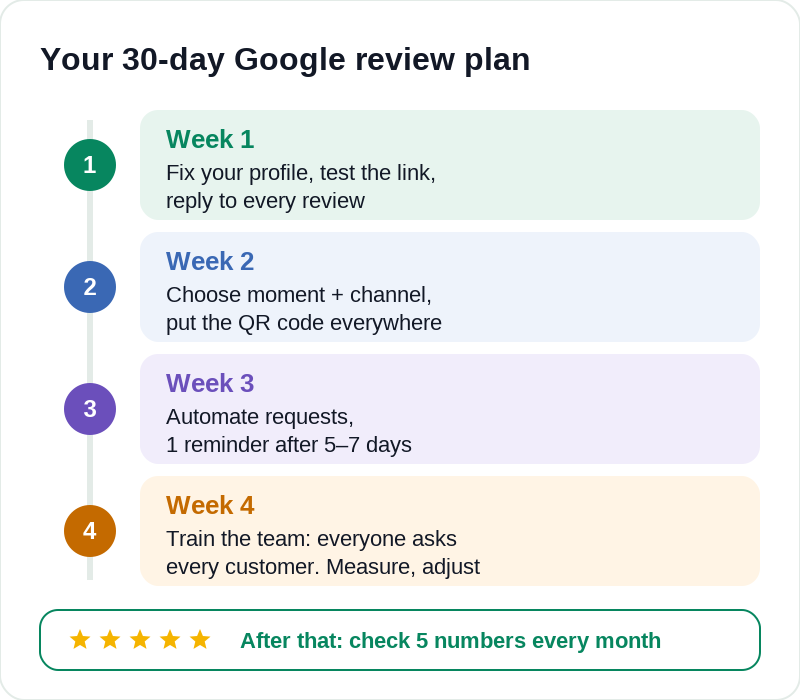
You don't need a fancy dashboard. Five numbers a month tell you whether your approach works.
| Metric | How to calculate | What to watch |
|---|---|---|
| New reviews per month | Count in your Business Profile | A steady flow beats spikes |
| Review rate | New reviews ÷ requests sent | Dropping? Test another moment or channel |
| Average rating (last 90 days) | Average of recent reviews only | Says more about today than your all-time score |
| Reply rate | Reviews with a reply ÷ all reviews | Aim for 100%, positive reviews included |
| Reply time | Days between review and your reply | Within 1–2 business days looks professional |
Recurring complaints in reviews are free product research. If you want to measure satisfaction more systematically alongside reviews, see our guide to the Net Promoter Score.
You can do everything in this guide without extra software: Google's link and QR code are free. A tool mainly helps when you have many customers or use several review platforms.
FeedbackPlatform's Starter plan includes a Smart Review Hub: one link and QR code that send customers on to Google or other review platforms. You also get email review invitations, weekly sync of your Google reviews, and Google review widgets to show them on your website. There's no cost per review or invitation.
One rule applies to every tool, ours included: set it up so that every customer, unhappy ones too, can leave a public review. Asking for private feedback is fine; blocking the road to Google is not. Curious how this compares to using Google alone? See FeedbackPlatform vs Google reviews.
Today, grab your review link and QR code, test them, and choose one fixed moment when you ask every customer. In 30 days, count what it brought in. And if you get a review that is genuinely fake or breaks the rules, read how to remove a Google review.
A strong Google Business Profile is free and brings customers from Search and Maps. Here's how to create and verify it, fill in every field that matters, rank locally and avoid suspension.

Shoppers buy when doubt disappears. This checklist covers the trust signals that move ecommerce conversion: business identity, payment options, policies, reviews, trust badges and the technical basics.
The best Trustpilot alternative depends on your goal: Google reviews for local visibility, Judge.me or Yotpo for Shopify product reviews, Reviews.io or Feefo for Google seller ratings, Trusted Shops or BBB for a trustmark. Prices checked November 2026.