Review Request Email Templates: 16 Examples You Can Copy
A good review request is short, personal, arrives right after the customer experiences the result, and has one button. Below are 16 copy-ready templates for email, text, WhatsApp, invoices and B2B, plus subject lines, timing and the rules.
FeedbackPlatform editorial teamNovember 25, 2026 12 min read
A good review request is short, personal, arrives right after the customer experiences the result, and has one clear button. Below are 16 templates you can copy for email, text, WhatsApp, invoices, packing slips and B2B, plus subject lines, a timing table and the US and UK rules you need to know.
In short
A strong request has five parts: personal greeting, what they bought, one honest question, how long it takes, and one button.
Send it as soon as the customer has experienced the result: online store 2–5 days after delivery, salon within 2 hours, contractor the same day.
One reminder at most, after 5–7 days, only to people who haven't responded.
No incentives for reviews, and ask everyone, not just happy customers. Google bans both, and the FTC and CMA police fake or distorted reviews.
Email: include your postal address and an unsubscribe link (CAN-SPAM). Texts: get consent first and honor STOP (TCPA).
Track your review rate: new reviews ÷ requests sent.
What makes a good review request email?
A good review request reads like a note from a person, not a system. It takes ten seconds to read, and the customer knows exactly what you're asking.
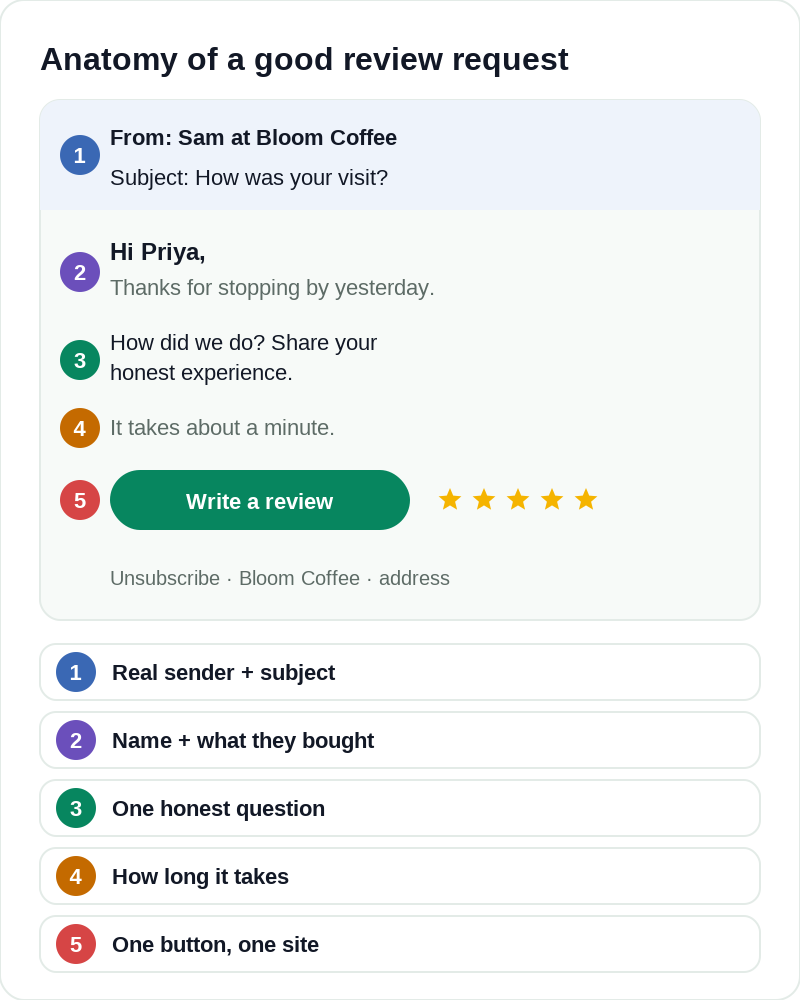
The five parts of a review request that gets results.
Sender and subject: a real name ("Sam at Bloom Coffee") and a subject line about the customer, not about you.
Personal greeting and context: their first name and what they bought or had done.
One honest question: "How did we do?" beats "Leave us 5 stars!". Asking for positive reviews only is also a red flag for regulators.
Expectation: "It takes about a minute." Small asks get answered.
One button: to one review site. Two buttons (Google and Facebook) create hesitation.
Always close with your business name, your postal address, an unsubscribe link and a way to reach you directly if something went wrong.
Review request email templates
Replace everything in [square brackets]. Keep the button text short and active: "Write a review", "Share your experience".
1. Online store: request after delivery
Subject: How's your [product name] working out?
Hi [first name],
Your [product name] arrived a few days ago. We'd love to know: how is it?
Would you share your honest experience? It takes about a minute and helps other shoppers decide.
[Write a review]
If anything isn't right, just reply to this email and we'll fix it.
Thanks, [name] at [store]
2. Local business: asking for a Google review
Subject: Thanks for stopping by, [first name]
Hi [first name],
Thanks for visiting [business name] yesterday. As a local business, most new customers find us on Google. Would you mind sharing a few words about your visit?
[Leave a Google review]
Honest feedback is welcome, critical included. That's how we get better.
[name]
3. Short version (great on mobile)
Subject: One quick question about your order
Hi [first name], how was your experience with [store]? One minute, one click: [Share your experience]. Thank you! [name]
4. Follow-up reminder after 5–7 days
Subject: Still happy with your [product name]?
Hi [first name],
Last week we asked about your experience with [product name]. Didn't get to it? No problem. If you have a minute now, we'd really like to hear what you think.
[Write a review]
This is the last time we'll ask. Thanks, [name]
Review request text message and WhatsApp templates
Texts are almost always read, and they feel personal. Keep them under 160 characters, name your business, and only send to customers who agreed to receive texts. Add opt-out wording to every message.
5. Text after an appointment
Hi [first name], thanks for visiting [business] today! Could you share your honest feedback? Takes 1 minute: [link] Reply STOP to opt out.
6. Text after delivery
[Store]: your order was delivered. How do you like it? Share your experience: [link] Reply STOP to opt out.
7. WhatsApp or text: salon or spa
Hi [first name]! Lovely to see you today. Happy with how it turned out? A quick review would mean a lot: [link]. And if anything's not quite right, just message us here and we'll book a free touch-up. [name]
In template 7, the free touch-up is offered to anyone with a complaint and doesn't depend on the review, so it isn't an incentive.
8. Text: contractor or tradesperson
Hi [first name], [name] from [business] here. Your [boiler/bathroom/roof] is all done. Everything working as it should? If you have a moment, an honest Google review really helps a small business like ours: [link]. Thanks for trusting us! Reply STOP to opt out.
Templates for invoices, packing slips and the front desk
Printed requests reach every customer, no email address needed. Pair them with a QR code; see how to get more Google reviews for where to find yours.
9. Line on the invoice or receipt
Happy with our service, or not quite? Tell us and others at [short link] or scan the QR code. Thank you!
10. Thank-you card in the package
Thanks for your order! We're a small team and we read every review. Scan the code and tell us honestly what you think.
11. Said out loud at the counter
"Thanks for coming in. We ask everyone for an honest review because it helps us improve. The code's on this card. Have a great day!"
12. Email signature
How are we doing? Share your experience on Google: [short link]
B2B templates and requests after a complaint
Business clients expect a personal note from their account manager, not a no-reply address. After a complaint, fix the problem first, then ask.
13. B2B after a completed project
Subject: [Project name] is live – can I ask a favor?
Hi [first name],
Now that [project name] is live, I want to thank you for a great collaboration. Would you describe in a few sentences what it was like to work with [company]? Other companies genuinely read these.
[Write a review]
If you'd rather give private feedback first, give me a call.
Best regards, [name], [title]
14. After a complaint was resolved
Subject: Is everything sorted now?
Hi [first name],
Last week something went wrong with [issue]. Sorry again. I hope [solution] has put things right.
If you'd like to share your experience, including how we handled it, you can do that here: [Write a review]. Positive or critical, we appreciate it.
[name]
Never make a fix conditional on changing or removing an existing review. Google explicitly bans it, and in the US the FTC treats review suppression as a violation. If the customer already posted a critical review, answer it publicly; here's how to respond to negative reviews.
Asking for a Google review or a store review?
For local businesses, Google is usually the platform that matters most: it's where people search and where your map listing sits. Online stores often also need product reviews, or reviews on a third-party review platform. Pick one destination per request.
15. Product review for your online store
Subject: What do you think of your [product name]?
Hi [first name], you've had your [product name] for a week now. Other shoppers want to know: does the size fit, does the quality hold up? [Review your product]. Every review gets published, critical ones included.
16. Store review (service and delivery)
Subject: How was ordering from [store]?
Hi [first name], we'd love to hear how the whole order went: ordering, delivery and support. [Share your experience]. Thank you!
Not sure which platform to use alongside Google? See our comparison of Trustpilot alternatives.
Subject lines that get opened
Your subject line decides whether the email gets opened. Personal and specific beats generic and salesy.
Use this
Why it works
Avoid
How's your [product name] working out?
About the customer and the product
Review us for a chance to win…
[First name], quick question?
Personal, sparks curiosity
YOUR OPINION MATTERS!!!
One question about your visit
Short, sounds like little effort
2026 Customer Satisfaction Survey
Did everything arrive OK?
Caring, invites a reply
Give us 5 stars
When should you send a review request?
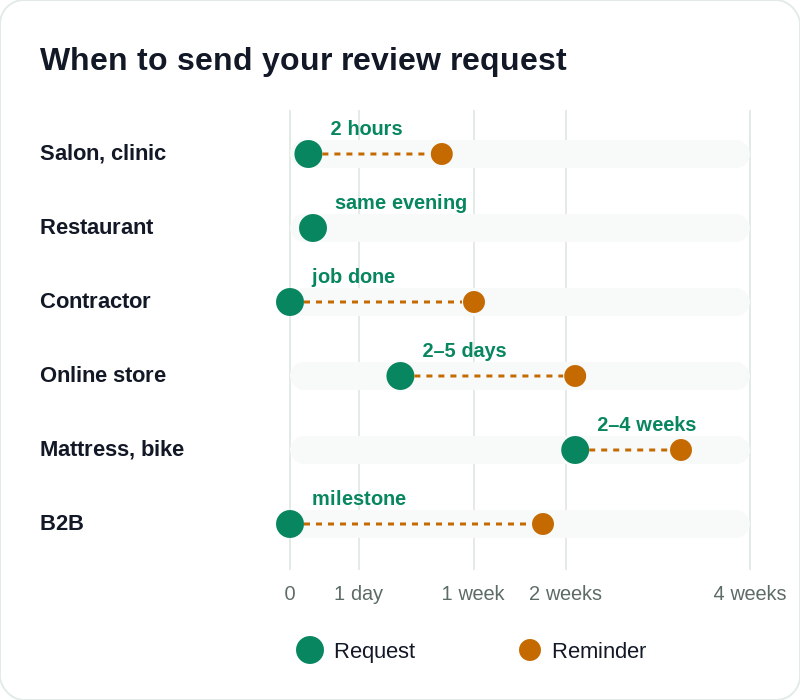
Send it as soon as the customer has experienced the result. That moment depends on your business.
Business type
First request
Reminder
Channel
Online store (quick-use product)
2–5 days after delivery
After 7 days
Email
Online store (needs testing, e.g. mattress)
2–4 weeks after delivery
After 7 days
Email
Restaurant
Same evening or next morning
None
QR code, email from reservation
Salon, spa, clinic
Within 2 hours
After 5 days
Text, WhatsApp
Contractor, plumber
Day the job is signed off
After 7 days
In person + text/email
B2B
After a milestone or review meeting
After 10 days
Personal email
The best moment for your request and reminder, by business type.
Send when people have time. For consumers, weekday evenings or weekends often beat Monday morning, but test it: every audience is different. For texts, stay well inside 8 a.m. to 9 p.m. local time, the window US rules set for telephone solicitations.
What's allowed in a review request?
You can ask every customer for an honest review. You can't reward reviews, filter who gets asked, or ignore email and text laws.
Do's and don'ts
Do
Don't
Ask every customer, including quiet or critical ones
Send only happy customers to Google (review gating)
Ask for an honest opinion
Ask for "5 stars"
Send one reminder
Keep emailing three or four times
Include an unsubscribe or STOP option every time
Bundle the request with a discount or promo
Fix complaints first, then ask
Tie a fix to editing or deleting a review
No incentives for reviews
Google bans any incentive for reviews: money, discounts, free products or prize draws. In the US, the FTC's rule on consumer reviews (in force since October 21, 2024) bans incentives conditioned on a particular sentiment, and the FTC's Endorsement Guides say inviting only very satisfied customers can be deceptive. In the UK, the DMCC Act bans fake reviews and concealed incentivized reviews from April 6, 2025.
US email: CAN-SPAM
The CAN-SPAM Act applies to commercial email. Whether a review request counts depends on its "primary purpose", and the FTC reads the "transactional or relationship" categories narrowly. Add a coupon or product promotion and it is clearly commercial. Play it safe and follow the rules anyway:
Accurate "From" name and a subject line that matches the content.
Your valid physical postal address in every email.
A clear way to opt out, honored within 10 business days.
No promotional content in the review request itself.
Each violating email can cost more than $50,000 in penalties, so this isn't a box to skip.
US text messages: the TCPA
The Telephone Consumer Protection Act covers automated texts. Get the customer's consent to receive texts before you send one; written consent captured at booking or checkout is the safest. Since April 11, 2025, FCC rules say customers can opt out "in any reasonable manner" (STOP, QUIT, CANCEL, UNSUBSCRIBE and similar), and you must honor it within 10 business days. If you text from a regular 10-digit number, carriers also expect you to register your brand and campaign (10DLC) through your messaging provider. Some states have stricter "mini-TCPA" laws, so check yours.
UK email and text: PECR and GDPR
In the UK, the Privacy and Electronic Communications Regulations (PECR) govern marketing emails and texts. The ICO says genuine market research is not direct marketing, but a message that includes promotional material is. So keep review requests free of offers. Mention review requests in your privacy notice, give customers the chance to refuse when they buy, and include an opt-out in every message. Under UK GDPR, most businesses rely on legitimate interests to send a request to their own customers.
This isn't legal advice. If you send at high volume, have a lawyer check your setup.
How do you measure whether your requests work?
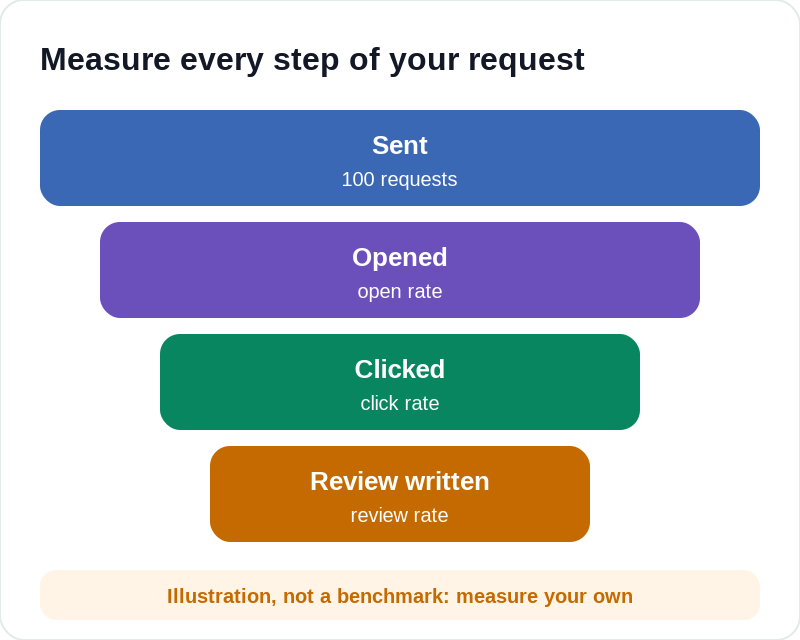
Track three steps: is the request opened, is the link clicked, and does it turn into a review? That shows exactly where customers drop off.
Metric
Formula
Low? Try this
Open rate
Opened ÷ sent
New subject line or sender name
Click rate
Clicked ÷ opened
Shorter copy, one bigger button
Review rate
New reviews ÷ sent
Different timing, fewer steps after the click
Unsubscribe rate
Unsubscribed ÷ sent
Fewer reminders, more personal tone
Measure every step: sent, opened, clicked, review written.
Open rates have become less reliable since Apple Mail Privacy Protection, which can register emails as opened automatically. Focus on clicks and actual reviews. Test one variable at a time: timing first, then subject line, then copy.
Replies sell your next request
Requests work better when new customers can see you respond to reviews. Reply to every review, good and bad. And if you want one number to track satisfaction alongside reviews, read our guide to the Net Promoter Score.
Automating your review requests
Nobody keeps up manual emails for long. Most store platforms, POS systems and booking tools can trigger an email or text after an event, such as "order delivered" or "appointment completed". Paste the templates above into those flows.
FeedbackPlatform can help here too. The Starter plan includes email review invitations and a Smart Review Hub: one link and QR code that send customers to Google or other review platforms, with no cost per invitation. Set it up so every customer, unhappy ones included, can still leave a public review. See the integrations or try the demo.
Your business already has a profile
Claim it for free, reply to reviews and collect more reviews on Google and your own website.
Pick one template from this list that fits your business, rewrite it in your own voice, and tie it to one fixed moment in your process. In a month, check your review rate. Then make those reviews work harder on your site with our guide to ecommerce trust signals.
Frequently asked questions
Thank them, mention what they bought or had done, ask for their honest opinion and say it takes about a minute. Include one link or QR code and send it right after they experience the result. Don't promise anything in return, and ask every customer, not just the ones who seemed happy.
Use the customer's first name, name the product or service, ask one honest question such as 'How did we do?', set expectations ('it takes a minute'), and add one clear button to one review site. Close with your name, a way to reply if something went wrong, your postal address and an unsubscribe link.
In the US, get the customer's consent to receive texts first, ideally written consent captured at booking or checkout, because the TCPA covers automated texts. Identify your business, keep it free of promotions and honor STOP and other opt-out requests within 10 business days. In the UK, PECR rules on electronic messages apply.
Once. Send a single reminder about five to seven days after the first request, only to customers who haven't reviewed or opted out. More reminders bring in few extra reviews but more unsubscribes and annoyed customers. Stop immediately for anyone who already left a review.
Not for Google reviews: Google bans any incentive. In the US, the FTC bans incentives conditioned on a positive or negative review, and other incentives may need a clear disclosure. In the UK, concealed incentivized reviews are banned. The safest approach is no incentive at all.
It varies widely by industry, channel and timing, so don't chase a generic benchmark. Measure your own: new reviews divided by requests sent. Then test one change at a time, such as send time or subject line, and see whether your rate goes up.
Your business already has a profile
Claim it for free, reply to reviews and collect more reviews on Google and your own website.
How to Get More Google Reviews: The Complete 2026 Playbook
To get more Google reviews, give every customer your official review link or QR code right after they experience your product or service, with no rewards and no cherry-picking. Here is exactly how.
Online reputation13 min read
Google Business Profile Guide 2026: Set Up, Verify, Optimize
A strong Google Business Profile is free and brings customers from Search and Maps. Here's how to create and verify it, fill in every field that matters, rank locally and avoid suspension.
Trust and conversion13 min read
Ecommerce Trust Signals: The Checklist That Lifts Conversion
Shoppers buy when doubt disappears. This checklist covers the trust signals that move ecommerce conversion: business identity, payment options, policies, reviews, trust badges and the technical basics.

 Login