Ecommerce Trust Signals: The Checklist That Lifts Conversion
Shoppers buy when doubt disappears. This checklist covers the trust signals that move ecommerce conversion: business identity, payment options, policies, reviews, trust badges and the technical basics.
FeedbackPlatform editorial teamNovember 25, 2026 13 min read
The fastest way to increase your ecommerce conversion rate is to remove doubt. Most visitors who leave don't dislike your product. They just aren't sure you can be trusted with their money. This checklist shows which trust signals fix that, and where on the page they belong.
In short
In Baymard's research, 19% of US shoppers who abandoned checkout didn't trust the site with their card details. Surprise costs (40%) and a weak returns policy (13%) lose buyers too.
Show who you are: legal name, physical address, phone, company and VAT numbers, and real photos. In the UK and EU most of this is a legal requirement.
Offer payment methods with buyer protection (cards, PayPal, Apple Pay, Google Pay, BNPL) and show the logos on the product page.
Put delivery dates, returns and warranty next to the buy button, not only in the terms.
Show reviews and stars by the price, including critical ones, and reply to them. Google shows stars for product reviews, not for reviews about your own business on your own site.
Get the technical basics right: HTTPS, a fast mobile site, and email with SPF, DKIM and DMARC.
Why does a lack of trust cost you conversions?
Because buying from an unknown store is a risk. The shopper pays upfront to someone they've never heard of, and wants to know the parcel will arrive and that returns will work.
Baymard Institute's cart abandonment research has tracked this for years. The average documented cart abandonment rate is around 70%. Among US shoppers who abandoned during checkout (excluding the "just browsing" group):
Reason for abandoning
Share
Trust signal that helps
Extra costs too high (shipping, tax, fees)
40%
Show total price and shipping early
Delivery too slow
20%
A concrete delivery date by the button
Didn't trust the site with card details
19%
Familiar payment methods, visible security
Had to create an account
18%
Guest checkout
Returns policy wasn't satisfactory
13%
A clear, generous returns page
Not enough payment methods
9%
Cards, wallets, PayPal, BNPL
Baymard estimates the average large ecommerce site could gain a 35% increase in conversion rate through better checkout design alone. A big part of that is trust.
Reviews matter just as much. The Spiegel Research Center found that a product with five reviews is 270% more likely to be purchased than one with none. Purchase likelihood peaked at an average of 4.0 to 4.7 stars, not at a perfect 5.0.
Your customers check you before they buy
"Is [store] legit" is one of the most searched phrases in US ecommerce: "is this website legit" alone gets tens of thousands of searches a month. Many of your visitors arrive after they've already looked you up. What they find decides whether they come back.
How do shoppers decide whether your store is legit?
They look at your site and at what others say about you. They search your name plus "reviews" or "scam", read Google and Trustpilot reviews, check the Better Business Bureau in the US, and increasingly paste your domain into a website checker.
Our guide on how to tell if a website is legit shows exactly what consumers are taught to check. Look at your own store through that lens: everything a scammer can't fake should be obvious on your site.
The Trust score: what an outsider sees automatically
Anyone can check a domain for free at feedbackplatform.com/reputation. The Trust score (0 to 5 stars) is built from four parts. You can't pay for a better score, but you can fix the inputs.
Part
Points
What you can improve
Company details
30
Company registration and VAT number on your site (VAT validated in EU VIES), address, phone, email, contact page, privacy policy, terms, returns policy
Reviews
30
Collect reviews and reply to them
Safety
25
HTTPS, payment methods with buyer protection, SPF and DMARC on your email domain
Stability
15
Social and review profiles; domain age grows on its own
Watch the warning signs that cap the score. A store offering only payment methods without buyer protection maxes out at 2.3 stars. An invalid VAT number caps it at 1.8 stars. A site younger than 90 days without verifiable company details can't go above 2.3 stars.
Who are you? Business details that build trust
The first thing a hesitant shopper looks for is proof that a real business sits behind the store. In many countries that's also the law.
UK: the Electronic Commerce Regulations 2002 require your name, geographic address, email address, company registration number and VAT number where applicable.
EU: consumer law requires your identity, geographic address, phone number and email before the sale. Many countries add company and VAT numbers.
US: there's no single federal rule, but shoppers expect a physical address, phone number and a named company. A missing address is one of the first things scam checkers flag.
Put these details in the footer of every page, so a shopper sees them on a product page and not only after three clicks.
What else helps (not required, but effective)
An About page with real people. Photos of the team, warehouse or workshop. Everyone recognises stock photos.
A phone number someone answers. State your hours and stick to them.
Consistent details everywhere. The same business name on your site, invoices, Google Business Profile and the customer's card statement. A different descriptor on the statement triggers chargebacks.
Check your own VAT number
If you sell in the EU, a mistyped or outdated VAT number creates doubt instead of trust. Check it in the European Commission's VIES service. Careful shoppers and checking tools do.
Which payment methods make shoppers trust you?
The ones that let the customer get their money back if something goes wrong. A store that only takes bank transfers, Zelle, gift cards or crypto is a classic red flag.
In the UK, Section 75 covers purchases from £100 to £30,000
PayPal
PayPal Buyer Protection for items not received or not as described
Keep proof of delivery for Seller Protection
Apple Pay / Google Pay
Fast, familiar, backed by the underlying card
Mostly mobile
Buy now, pay later (Klarna, Afterpay, Affirm)
Customer pays after delivery or in parts
EU credit rules apply since 20 November 2026
Local methods (iDEAL / Wero, Bancontact)
Expected in the Netherlands and Belgium
iDEAL is moving to Wero through 2027
Show your payment logos on the product page, under the buy button. A shopper who finds out at the last step that their preferred method is missing is gone. For more on how customers weigh payment risk, see the safest way to pay online.
How do you make returns, shipping and warranty reassuring?
By being specific and putting the promise where the decision happens. "Returns accepted per our terms" does nothing. "Free returns within 30 days, refund within 5 business days" does.
Returns. EU consumers have a 14-day right of withdrawal for online purchases, and UK consumers have 14 days under the Consumer Contracts Regulations. The US has no federal right to return, so your policy is the promise. More detail in our guide to online shopping rights. Say who pays return shipping and how fast refunds land.
Shipping. "Order by 3 pm, delivered Thursday with UPS" beats "ships in 1-5 business days". In the US, the FTC's Mail, Internet, or Telephone Order Merchandise Rule requires a reasonable basis for any shipping time you state, or shipment within 30 days if you state none.
Warranty. Explain what your own warranty adds. In the UK and EU, don't present statutory rights as an extra you're generously offering.
Complaints. A findable contact route with a response time. If you're a member of a dispute resolution scheme, name it.
Remove the old EU ODR link
Many EU and UK stores still link to the European ODR platform. It closed on 20 July 2025, and the obligation to link to it ended. A dead link in your terms looks careless.
Where should you show reviews, and can you get stars in Google?
Reviews work best right next to the decision: by the price, under the product photo and in the cart. A reviews page nobody opens sells nothing.
Where reviews do the most work
Product page, right under the title: stars plus the count ("4.6 from 312 reviews"), linking to the reviews.
Next to the buy button or in the cart: a short quote or your overall store rating.
Home and category pages: a widget with recent, dated reviews.
Order confirmation and delivery emails: where you ask for new reviews.
Show critical reviews and your replies too. A wall of perfect five-star ratings looks suspicious, and Spiegel saw purchase likelihood peak between 4.0 and 4.7 stars. Learn how to reply well in how to respond to negative reviews.
Product structured data with genuine product reviews
Stars for reviews about your own business, on your own site
No
Google calls these "self-serving", even via a widget
Store ratings on Shopping ads and free listings
Yes
Generally at least 100 unique reviews per country over the past 24 months
The self-serving rule is in Google's review snippet guidelines: pages with LocalBusiness or Organization markup about your own business aren't eligible for stars, even if the reviews come from an embedded Google or Facebook widget. Store ratings draw on Google Customer Reviews, Google's own shopping research and a list of approved review partners, and need an average of at least 3.5 stars to show on ads.
Fake reviews are now expensive
In the US, the FTC's rule on consumer reviews and testimonials has applied since 21 October 2024. It bans fake reviews, buying reviews and suppressing negative ones, and allows civil penalties. In the UK, the DMCC Act banned fake reviews from 6 April 2025. In the EU you must tell shoppers whether and how you check that reviews come from real customers.
Want your Google reviews on your own product pages? FeedbackPlatform's Google review widgets display them and sync weekly. Plenty of other tools do this as well; see our comparison of Trustpilot alternatives.
Do trust badges still work?
Yes, when they mean something. A badge backed by a real check gives shoppers certainty you can't give yourself. A home-made "100% secure checkout" graphic adds little.
Recognised brands win. In Baymard's checkout research, Norton's seal ranked highest, most top performers were trust seals rather than SSL seals, and a padlock near the card fields also helped.
Place them at the payment step. A visually framed card section with one or two badges inside it feels safer, even though the whole HTTPS page is equally encrypted.
Never show a badge you haven't earned. In the EU and UK, displaying a trust mark without authorisation is on the blacklist of unfair commercial practices. A shopper who clicks the badge should land on your certificate.
Review-platform badges are social proof too. A live widget with your rating on an independent platform works because shoppers can verify it.
Technical trust: HTTPS, speed and email that arrives
Shoppers only notice technology when it breaks. Then it's immediately a trust problem.
HTTPS without errors. No mixed content, no expired certificate. A browser warning costs you that visitor.
Email on your own domain with SPF, DKIM and DMARC. Since 2024 Gmail and Yahoo require all three from bulk senders, and without them your order confirmations land in spam more often. DMARC also makes it harder for scammers to send phishing emails as you.
Domain age. You can't make a new domain older. Make up for it with more verifiable details: company number, address, phone and genuine reviews.
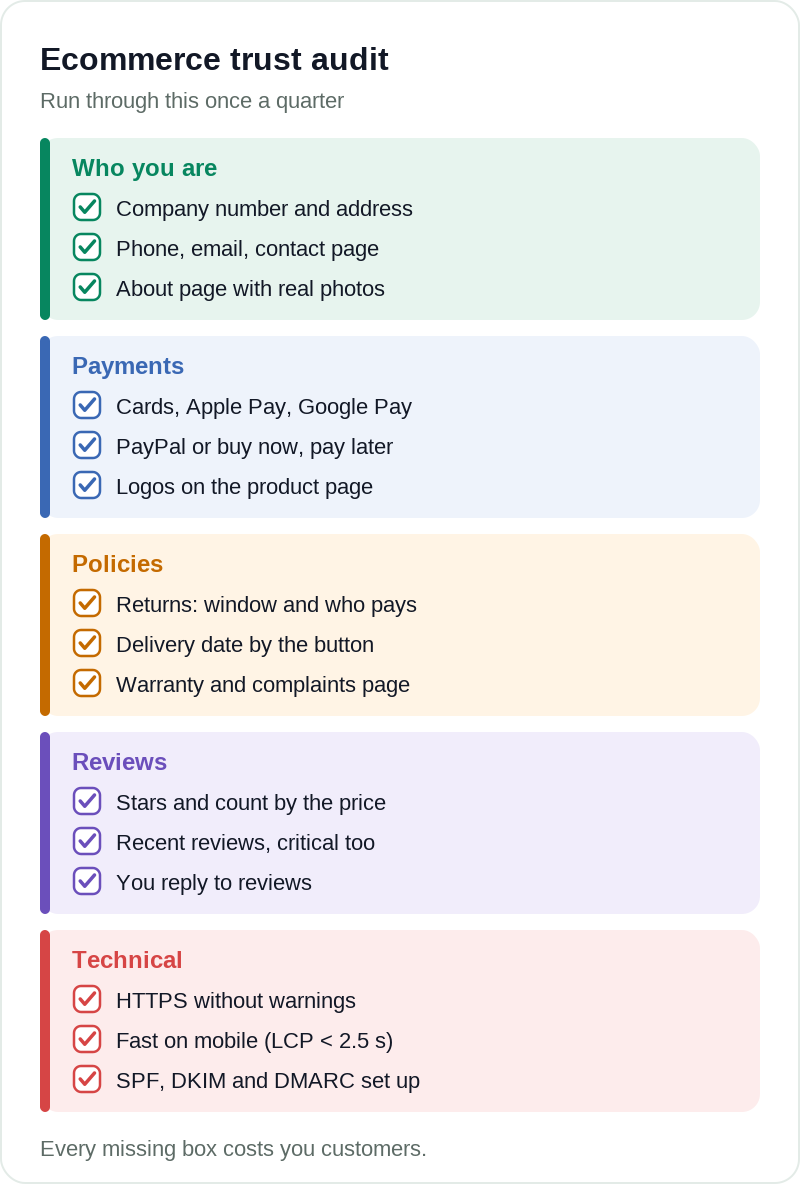
Run through these fifteen points every quarter.
What does a high-trust product page look like?
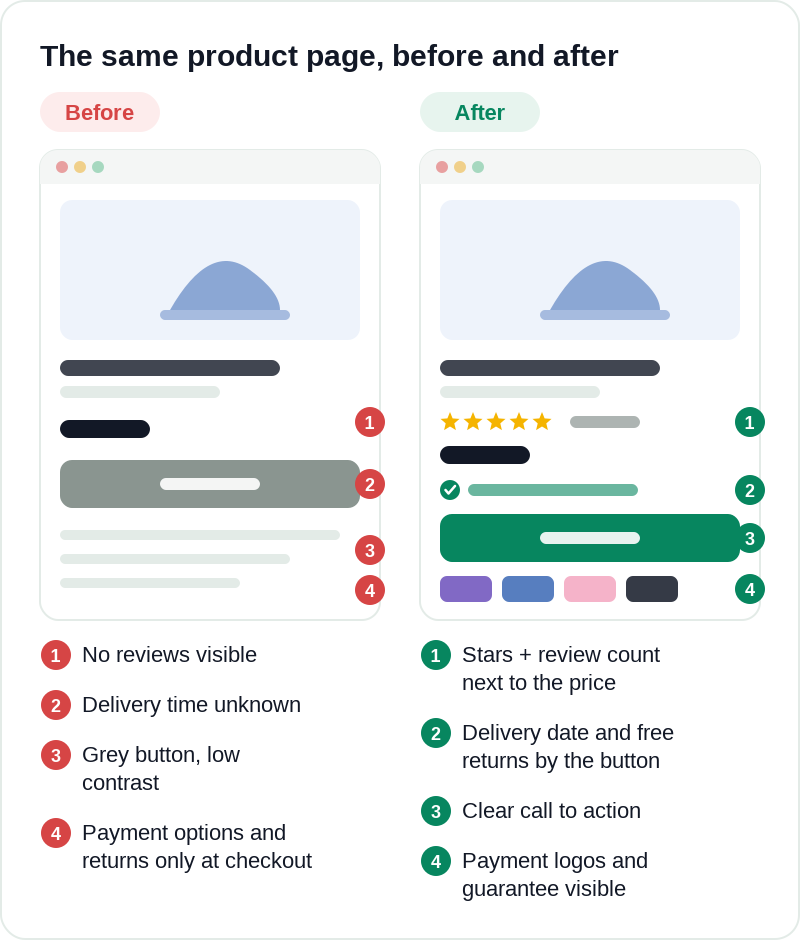
The difference is often four small blocks around the buy button. You don't need a redesign.
Four changes around the button remove most of the doubt.
A camping gear store in Colorado
A small Shopify store sells $129 tents. The product page shows a photo, the price and a grey button. Reviews live on a separate page, the return window is buried in the terms, and PayPal only appears at the final step.
The owner moves four things: stars with "4.7 from 86 reviews" under the title, "Order by 2 pm, arrives Friday with UPS · Free 30-day returns" just above the button, a high-contrast button, and the Visa, Apple Pay, PayPal and Afterpay logos below it. The footer gets the legal business name, address and phone number.
She runs the new page against the old one in an A/B test and, after a month, checks not just the conversion rate but also the number of "where is my order?" emails. That number should drop.
How do you run a trust audit on your store?
Block an hour and look at your store as a first-time visitor, on your phone.
Google your own store. Search "[your store] legit", "[your store] reviews" and "[your store] scam". What does a doubter find?
Check your profile at /reputation. See which parts of the Trust score leave points on the table.
Open a product page on mobile. Can you see stars, delivery date, returns and payment logos without scrolling?
Go through checkout to the payment step. Is the total clear early on? Can you check out as a guest?
Click through your footer. Business details, returns page, complaints route, privacy policy: all present and current?
Click every badge. Does it lead to a valid certificate?
Place a test order. Does the confirmation land in the inbox or in spam? Have your SPF, DKIM and DMARC set-up checked.
Measure speed on your busiest product page in PageSpeed Insights.
Read your last ten reviews. Did you reply to the critical ones?
Pick the three biggest gaps and fix them this month.
Your business already has a profile
Claim it for free, reply to reviews and collect more reviews on Google and your own website.
Start with the footer and the product page: complete business details, payment logos and the returns promise by the button, stars under the title. That's an afternoon of work. Then build a steady flow of honest reviews and keep the site fast and secure. Repeat the audit every quarter, because payment methods, rules and your own site change faster than you think.
Frequently asked questions
Trust signals are anything that shows a visitor your store is real, safe and fair: company details and a physical address, familiar payment methods, clear return and delivery promises, reviews and ratings, recognised trust badges, HTTPS and a fast, error-free site. They work best close to the buying decision, next to the price and the add-to-cart button.
They can, if shoppers recognise them. Baymard's research found that seals and a padlock near the card fields raise perceived security, and that the brand of the seal matters. A recognised badge backed by a real check beats a generic '100% secure' graphic. Test placement with an A/B test, because results differ by audience.
Social proof is evidence that other people already trust you: product reviews, star ratings, customer photos, the number of buyers, or your score on an independent review platform. It is most persuasive when it is recent, verifiable and placed by the price. Fake reviews and invented numbers are illegal under the FTC rule in the US and the DMCC Act in the UK.
For product pages with genuine product reviews, yes, using Product structured data. Reviews about your own business on your own site are 'self-serving' and not eligible, even through a widget. Stars next to your ads and free listings come from Google store ratings, which generally need at least 100 unique reviews per country.
Methods that let the customer get money back if something goes wrong: credit cards (chargebacks, and in the US the Fair Credit Billing Act), PayPal with Buyer Protection, Apple Pay and Google Pay on top of a card, and well-known buy now, pay later providers. A store that only accepts bank transfers or crypto looks risky to cautious shoppers.
Google rates a Largest Contentful Paint of 2.5 seconds or less as good. In the Deloitte and Google study Milliseconds Make Millions, a 0.1-second improvement in mobile site speed went together with an 8.4% increase in retail conversions. Start by measuring your busiest product pages in PageSpeed Insights.
Your business already has a profile
Claim it for free, reply to reviews and collect more reviews on Google and your own website.
How to Get More Google Reviews: The Complete 2026 Playbook
To get more Google reviews, give every customer your official review link or QR code right after they experience your product or service, with no rewards and no cherry-picking. Here is exactly how.
Online reputation13 min read
Google Business Profile Guide 2026: Set Up, Verify, Optimize
A strong Google Business Profile is free and brings customers from Search and Maps. Here's how to create and verify it, fill in every field that matters, rank locally and avoid suspension.
The best Trustpilot alternative depends on your goal: Google reviews for local visibility, Judge.me or Yotpo for Shopify product reviews, Reviews.io or Feefo for Google seller ratings, Trusted Shops or BBB for a trustmark. Prices checked November 2026.

 Login